Microsoft Expands Windows 11 Copilot Key Customization After User Backlash
AI Overview Snippet
Microsoft is introducing new Windows 11 Copilot key customization options after users criticized the dedicated AI keyboard button on newer laptops. The update will allow users to remap the Copilot key into traditional functions like Right Ctrl or Context Menu, helping improve productivity, accessibility, and user control. The move reflects Microsoft’s changing AI strategy as the company balances innovation with customer feedback.
Microsoft Expands Windows 11 Copilot Key Customization Following Massive Criticism
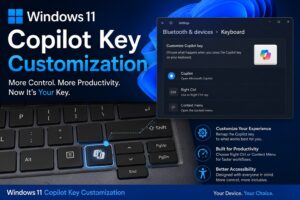
Microsoft is finally responding to growing criticism from Windows users by expanding Windows 11 Copilot key customization options across supported devices. The company’s latest move comes after months of backlash surrounding the dedicated Copilot key introduced on AI-powered Windows laptops and keyboards.
The update is expected to give users more flexibility by allowing them to remap the Copilot key into traditional keyboard functions such as the Right Ctrl key or the Context Menu key. While Microsoft originally promoted the Copilot key as a major step toward AI-first computing, many users argued that replacing familiar keys negatively impacted productivity and usability.
Now, the Windows 11 Copilot key customization update could become one of Microsoft’s most important changes for improving user trust and Windows 11 adoption.
Why the Windows 11 Copilot Key Customization Update Matters
When Microsoft first introduced the Copilot key, the company described it as the biggest keyboard change in decades. The dedicated AI key was designed to launch Microsoft Copilot instantly, giving users quick access to AI-powered features and tools.
However, the rollout quickly created controversy.
Many laptop manufacturers removed the traditional Context Menu key or Right Ctrl key to make room for the Copilot button. For millions of long-time Windows users, this change disrupted keyboard shortcuts, productivity workflows, and accessibility functions.
The new Windows 11 Copilot key customization feature directly addresses these concerns.
Users will soon have the ability to restore familiar keyboard functionality instead of being forced to use a dedicated AI shortcut. This may sound like a minor update, but for professional users, developers, gamers, and enterprise customers, it represents a major quality-of-life improvement.
The Windows 11 Copilot key customization update also signals that Microsoft is becoming more responsive to user feedback after several controversial AI-related decisions.
Microsoft’s AI Strategy Faces Increasing Pressure
Over the last two years, Microsoft has aggressively integrated artificial intelligence into nearly every aspect of Windows 11. The company transformed Copilot from a simple chatbot into a system-wide AI assistant connected to productivity apps, system settings, search tools, and cloud services.
AI features began appearing across:
AI Features Added Across Windows 11
- Microsoft Paint
- Notepad
- File Explorer
- Photos App
- Windows Search
- Taskbar
- Microsoft Edge
- Keyboard Hardware
While Microsoft positioned these AI additions as productivity enhancements, many users felt overwhelmed by the rapid expansion of AI tools inside the operating system.
The Windows 11 Copilot key customization update appears to be part of a broader effort to reduce frustration and improve flexibility.
Instead of forcing AI experiences onto users, Microsoft now seems more willing to provide customization and optional controls.
This shift is especially important because consumer sentiment toward AI-powered software has become increasingly divided. Some users enjoy AI features for automation and productivity, while others prefer a cleaner and more traditional computing experience.
By expanding Windows 11 Copilot key customization, Microsoft is attempting to satisfy both groups.
Accessibility Concerns Accelerated Microsoft’s Decision
Accessibility concerns played a major role in the backlash against the Copilot key.
The Right Ctrl key is widely used in accessibility shortcuts, assistive technologies, screen readers, and enterprise software workflows. Replacing this key with a dedicated AI shortcut created problems for users who rely on consistent keyboard navigation.
For disabled users and accessibility-focused professionals, the issue was not simply about convenience. It directly affected usability.
The Windows 11 Copilot key customization update helps solve this problem by restoring keyboard flexibility.
This move is also important for enterprise compliance and accessibility standards. Many organizations require consistent keyboard layouts across employee devices, especially in education, government, and large corporate environments.
Without expanded customization options, some businesses may have delayed adoption of AI-powered Windows laptops altogether.
Enterprise Customers Could Benefit the Most
The Windows 11 Copilot key customization update may prove particularly valuable for enterprise users.
Businesses rely heavily on standardized workflows and keyboard shortcuts to maintain productivity across teams. Any unexpected hardware changes can increase training costs and reduce efficiency.
Enterprise IT administrators often deploy company-wide shortcut systems for:
Common Enterprise Workflow Shortcuts
- Productivity software
- Virtual desktop management
- Remote access systems
- Accessibility tools
- Development environments
- Data entry platforms
The removal of traditional keyboard functions disrupted these systems for many users.
With expanded Windows 11 Copilot key customization settings, organizations will have greater control over device management and employee workflows.
This flexibility could help Microsoft maintain momentum in the enterprise PC market while still promoting AI-powered Copilot services.
AI PCs Are Reshaping the Laptop Industry
The controversy surrounding the Copilot key also highlights how rapidly the PC industry is changing.
Since launching the Copilot+ PC initiative, Microsoft has worked closely with major laptop manufacturers including ASUS, Dell, HP, Lenovo, Acer, and Samsung to push AI-focused hardware into the mainstream market.
These AI PCs feature:
Features of Modern AI PCs
- Dedicated Copilot key
- Neural Processing Units (NPUs)
- AI-enhanced battery optimization
- On-device AI processing
- AI-powered productivity tools
- Advanced voice recognition
- Smart camera enhancements
Microsoft believes AI PCs represent the future of computing.
However, the backlash against the Copilot key demonstrates that users still value traditional hardware functionality and familiar workflows.
The Windows 11 Copilot key customization update reflects an important lesson for Microsoft and hardware manufacturers: AI innovation must not come at the cost of usability.
Consumers want AI features, but they also want control over how those features integrate into daily workflows.
Windows 11 User Feedback Is Influencing Microsoft
The expansion of Windows 11 Copilot key customization shows that Microsoft is increasingly paying attention to public feedback.
Over the past year, criticism surrounding AI integration in Windows 11 has become louder across social media platforms, tech forums, and enterprise communities.
Some users argued that Microsoft was prioritizing AI marketing over stability, performance, and user experience.
Others criticized:
Major Windows 11 AI Complaints
- Forced AI integrations
- Increased system complexity
- Privacy concerns
- Performance overhead
- Unwanted background features
- Reduced user control
- Confusing interface changes
The controversy surrounding Windows Recall further intensified concerns about privacy and AI overreach inside Windows 11.
As a result, Microsoft appears to be adjusting its strategy by giving users more customization options instead of mandatory AI-focused changes.
The Windows 11 Copilot key customization update is one of the clearest examples of this new direction.
Could This Improve Windows 11 Adoption?
Microsoft is under pressure to increase Windows 11 adoption before Windows 10 support officially ends.
Although Windows 11 adoption has grown steadily, many users remain hesitant due to concerns about:
Reasons Some Users Avoid Windows 11
- Strict hardware requirements
- AI integration concerns
- Privacy issues
- Interface redesigns
- Compatibility fears
- Forced Microsoft account usage
The Windows 11 Copilot key customization update may help improve public perception by showing that Microsoft is listening to user concerns.
Customization has always been one of Windows’ greatest strengths. Giving users more flexibility aligns with the traditional Windows philosophy that people should control how their PCs function.
If Microsoft continues expanding personalization features while reducing aggressive AI implementation, Windows 11 could become more appealing to skeptical users.
Microsoft’s Future AI Strategy May Become More Flexible
The Windows 11 Copilot key customization update may indicate a larger philosophical shift within Microsoft.
Instead of forcing AI experiences into every part of the operating system, the company could move toward optional AI enhancements that users can customize based on personal preference.
This strategy would allow Microsoft to continue investing heavily in AI while reducing backlash from users who prefer traditional workflows.
The company still views Copilot as a core part of its long-term future. AI remains central to Microsoft’s business strategy across Windows, Microsoft 365, Azure, Edge, and enterprise software platforms.
However, the recent backlash has demonstrated that successful AI adoption depends on flexibility and user trust.
The Windows 11 Copilot key customization update is an important step toward rebuilding that trust.
Final Thoughts:
The Windows 11 Copilot key customization update may appear small at first glance, but it represents a significant shift in Microsoft’s approach to AI integration and user experience.
After months of criticism, Microsoft is finally giving users greater control over how AI features interact with traditional PC workflows. By allowing users to remap the Copilot key into familiar keyboard functions, the company is acknowledging that customization and usability still matter deeply to Windows customers.
The move could improve accessibility, enterprise adoption, productivity, and overall public perception of Windows 11.
More importantly, it signals that Microsoft understands an important truth about the future of AI-powered computing: users want innovation, but they also want choice.
As AI continues reshaping the technology industry, companies that balance advanced features with user control are likely to earn stronger long-term loyalty. The Windows 11 Copilot key customization update shows Microsoft is beginning to recognize that balance more clearly than before.

Rakesh is a digital publisher and SEO-focused tech writer covering technology trends, blogging strategies, affiliate marketing, and trending news. With expertise in search optimization and online growth, he delivers research-driven insights, practical guides, and timely news updates. His content focuses on helping readers understand digital trends, emerging technologies, and effective online publishing strategies in a rapidly evolving tech landscape.
Leave a Reply