Google Play Store Collections Widget Expands With Smarter Personalized App Discovery
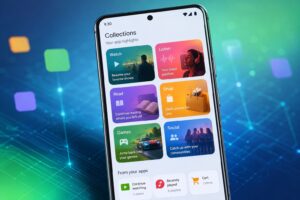
Google is continuing to improve the Android experience by expanding the Google Play Store Collections Widget, a feature designed to make app discovery faster and more personalized. Instead of opening several apps individually, users can now access recommendations, ongoing activities, shopping suggestions, entertainment content, and more directly from their Android home screen.
The latest improvements reflect Google’s growing focus on creating a smarter ecosystem where useful content appears exactly when users need it. Rather than functioning as just another widget, the Google Play Store Collections Widget serves as a personalized dashboard that helps users quickly return to their favorite apps and activities.
As Android devices continue to evolve, this feature has the potential to simplify everyday smartphone usage while making app engagement more efficient.
What Is the Google Play Store Collections Widget?
The Google Play Store Collections Widget automatically organizes installed applications into intelligent categories based on how users interact with them.
Instead of browsing through dozens of apps, Android users receive personalized suggestions that make everyday tasks easier. The widget can display recommendations for streaming content, shopping carts, reading progress, gaming updates, music playlists, and social activities without requiring users to manually search for each application.
Supported categories include:
- Watch
- Listen
- Read
- Shop
- Games
- Social
- Food
This organized interface reduces clutter while giving users quicker access to the content they use most frequently.
Smarter App Discovery for Android Users
One of the biggest challenges smartphone users face today is app overload. Most people install dozens of applications but regularly use only a small percentage of them.
The Google Play Store Collections Widget addresses this problem by intelligently surfacing relevant content directly on the home screen.
For example:
- Resume watching a TV series without opening multiple streaming apps.
- Continue reading an article or eBook instantly.
- View shopping recommendations from installed retail apps.
- Pick up unfinished gaming sessions.
- Resume music playlists with a single tap.
This contextual approach saves time and reduces unnecessary navigation.
Android users can now access personalized recommendations directly from their home screen. If you’re interested in Google’s expanding ecosystem, check out our coverage of the Google Finance Android app.
A More Personalized Android Experience
Personalization has become one of Google’s biggest priorities across Android services.
The Google Play Store Collections Widget uses information from installed applications to provide recommendations based on user activity. Instead of displaying generic shortcuts, the widget highlights ongoing activities that are more likely to be useful throughout the day.
This creates a more dynamic Android experience where the home screen adapts to individual habits rather than remaining static.
For users who frequently switch between entertainment, shopping, productivity, and social apps, the feature offers a much smoother workflow. The feature complements Google’s broader AI strategy, which is also reflected in the upcoming Google Pixel 11 and its AI-powered software enhancements.
Why Google Is Investing in Widgets
Widgets have been part of Android for years, but recent updates show Google placing renewed emphasis on making them more useful.
The company has encouraged developers to build richer widgets while making widget discovery easier through the Play Store.
The Google Play Store Collections Widget combines several functions into one interface:
- Personalized recommendations
- Quick app shortcuts
- Continue where you left off
- Intelligent content suggestions
- Faster access to installed apps
Instead of acting as a simple launcher, it becomes an information hub that brings relevant content together.
Availability
The Google Play Store Collections Widget is gradually becoming available across multiple countries, including India, the United States, the United Kingdom, Canada, Australia, Germany, France, Brazil, Japan, Indonesia, Spain, Italy, and Mexico.
Availability may vary depending on:
- Android version
- Device compatibility
- Play Store version
- Google account settings
Users running modern Android versions are most likely to receive the feature as Google continues expanding support.
Expert Analysis
The expansion of the Google Play Store Collections Widget signals a broader shift in Google’s software strategy.
Instead of relying solely on notifications to increase engagement, Google is making the Android home screen itself more intelligent. This approach benefits both users and developers.
For users, fewer taps are required to continue everyday activities.
For developers, the widget creates another surface where their applications can remain visible without sending constant notifications.
If Google continues improving recommendation quality and expands developer participation, Collections could become one of Android’s most valuable productivity features.
The long-term success of the widget will depend on how accurately it predicts user interests while avoiding information overload. Similar AI-powered improvements are also appearing in products like Google NotebookLM, highlighting Google’s unified AI ecosystem.
Why It Matters
The Google Play Store Collections Widget solves several common Android problems.
It reduces the time spent searching through installed applications, makes app discovery easier, improves user engagement, and delivers personalized recommendations without interrupting users with excessive notifications.
As smartphones become more central to daily life, intelligent features like this help simplify routine tasks and create a more seamless Android experience. Google’s focus on intelligent experiences now extends across smartphones, finance apps, wearables like Google Fitbit Air, and productivity tools.
Key Takeaways
- Google Play Store Collections Widget improves personalized app discovery.
- The widget brings recommendations directly to the Android home screen.
- Users can quickly resume shopping, streaming, gaming, reading, and music.
- Google is expanding the feature to more Android users globally.
- The update supports Google’s long-term vision of a smarter Android ecosystem.
Frequently Asked Questions
What is the Google Play Store Collections Widget?
It is an Android feature that organizes installed apps into personalized categories and displays relevant recommendations directly on the home screen.
Which devices support the feature?
Most modern Android devices running supported Play Store versions will receive the feature as it rolls out.
Can users remove the widget?
Yes. Like other Android widgets, it can be removed from the home screen at any time.
Does the widget recommend new apps?
Its primary purpose is to help users discover content and activities from installed apps while also improving overall app discovery.
Is the Google Play Store Collections Widget available in India?
Yes, India is among the countries where Google is rolling out the feature.
Final Verdict
The Google Play Store Collections Widget is another step toward a smarter Android experience. Instead of forcing users to navigate through dozens of applications, Google is bringing personalized recommendations directly to the home screen.
As Google continues investing in contextual experiences, this feature could become one of the most useful additions to Android, helping users save time while increasing engagement with the apps they already use.

Rakesh is a digital publisher and SEO-focused tech writer covering technology trends, blogging strategies, affiliate marketing, and trending news. With expertise in search optimization and online growth, he delivers research-driven insights, practical guides, and timely news updates. His content focuses on helping readers understand digital trends, emerging technologies, and effective online publishing strategies in a rapidly evolving tech landscape.
Leave a Reply